Architecture
Git2Docs uses a modular architecture that separates concerns between GitHub integration, AI processing, data storage, and user interfaces.
System Overview
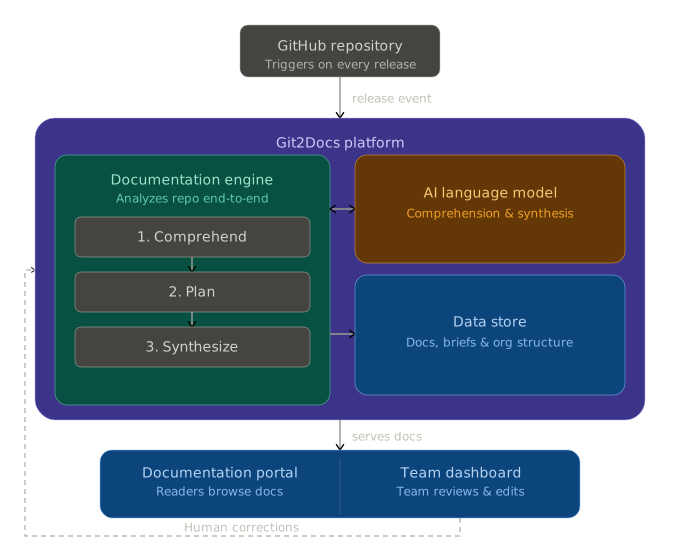
The diagram above shows how Git2Docs processes your code and delivers documentation to users. Each component plays a specific role in the pipeline.
Data Flow
- Trigger - A GitHub release event or manual trigger initiates the process.
- Clone - The worker clones your repository at the specified tag/branch.
- Analyze - The documentation engine analyzes the codebase structure and content.
- Generate - AI processes the analysis and generates documentation content.
- Store - Generated content is stored in the database with version tracking.
- Serve - The web app serves documentation to users through the portal.
Feedback Loop
Git2Docs has three feedback paths that all converge on the same consolidator-and-regen pipeline:
- Tell AI — maintainer leaves structured feedback on any section. Submit Review batches the open comments, Claude proposes a brief patch + the affected pages, Apply commits the brief and queues per-page regens. The primary refinement path for routine fine-tuning.
- Runtime validation (Tier 1) — an external coding agent exercises every documented CLI / API call against the live deployment and produces a findings file. Failed findings ingest as
doc_commentrows tagged with the validator's identity; the maintainer clicks Tell AI on each real failure and the same consolidator picks them up. - Hand-edit — direct edits to a section flip it to
human_owned; future AI regeneration leaves it alone. Reserved for surgical changes where invoking the AI would be overkill. If AI detects that the underlying code changed in a way that affects ahuman_ownedsection, it raises acontestedstate for review.
Three paths, one pipeline. Maintainer feedback and validator findings both become structured signals the synthesizer reads on the next pass — the docs converge on reality without anyone rewriting them by hand.
Deployment
Git2Docs is designed for cloud deployment with the following components:
| Component | Technology | Scaling |
|---|---|---|
| Web App | Next.js on Vercel | Serverless, auto-scaling |
| Worker | Node.js service | Horizontal scaling |
| Database | PostgreSQL (Neon) | Serverless, auto-scaling |
| AI | Claude API | API rate limits |