
Alternatives to DeepWiki
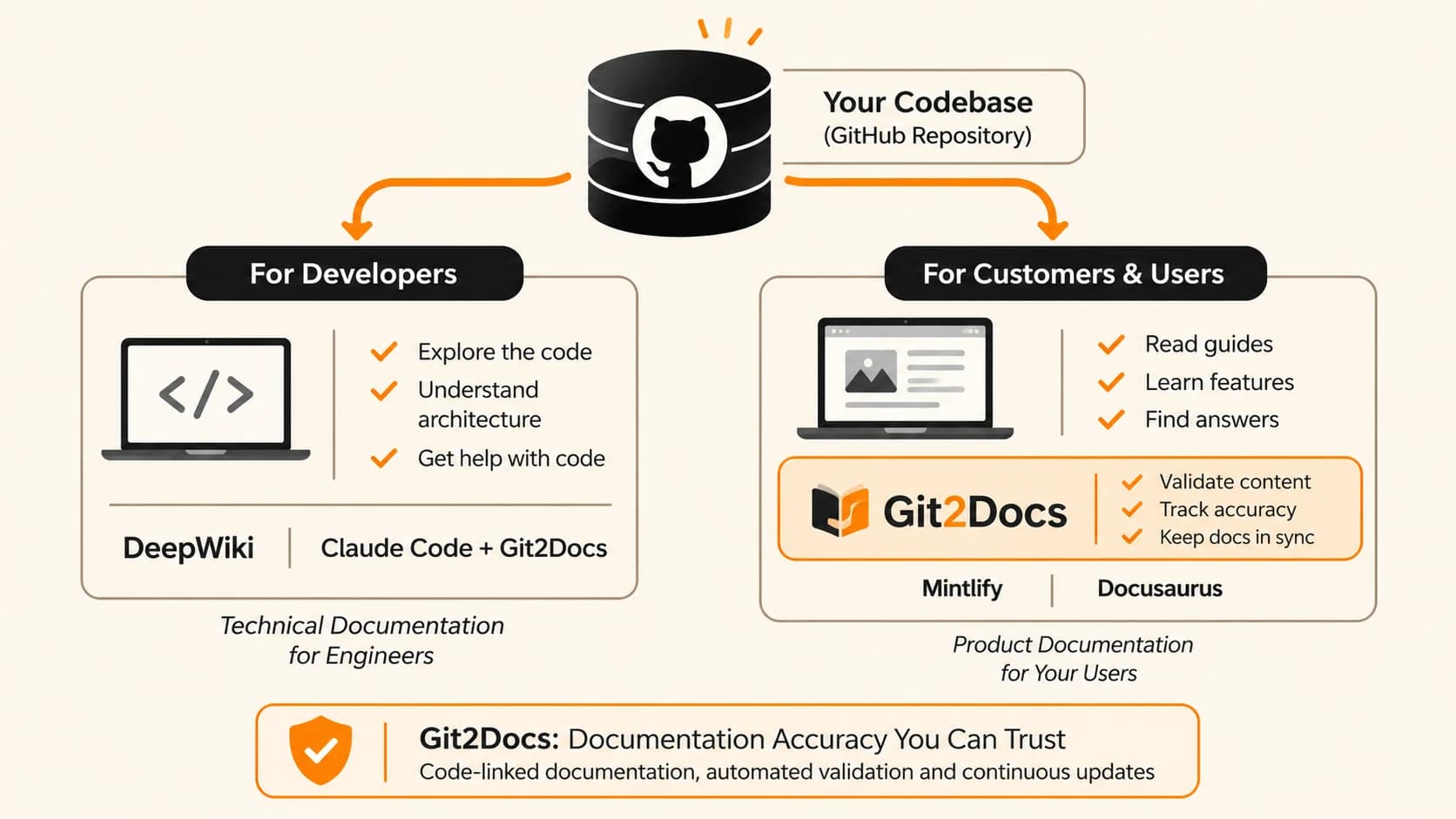
The short answer: the right alternative to DeepWiki depends on who will read the docs. If your engineers need to understand a codebase, Claude Code is the closest do-it-yourself replacement, and it works on private repos without a Devin subscription. Pair it with Git2Docs, and the docs Claude helps produce stay measured against your code as it changes. If your customers need docs on how to use your product, you want a published documentation site, such as Git2Docs, Mintlify or Docusaurus. Some teams use DeepWiki and one of these side by side.
DeepWiki, from Cognition (the makers of Devin), turns a GitHub repository into a wiki in minutes. Paste in a public repo’s URL and you get an architecture overview, diagrams and pages that link back into the source, with no account required. It’s a genuinely useful tool, and for many teams it’s all they need.
Teams usually go looking for alternatives to DeepWiki for one of three reasons:
- The repository is private, and they don’t use Devin, the Cognition product that private-repo wikis come with.
- The readers are customers, not internal engineering teams. DeepWiki explains how code works. Customers need to know how to use the product.
- They need to publish, with docs on their own domain, under their brand, current with every release.
This guide walks through the main alternatives, what each one is built for, and how to choose. We build Git2Docs, one of the tools on this list, so we’ve tried to be specific about where each option is the better fit, including DeepWiki itself. For a feature-by-feature table of Git2Docs and DeepWiki alone, see our Git2Docs vs DeepWiki comparison.
What DeepWiki does well, and where it stops
It’s worth being clear about DeepWiki’s strengths before replacing it, because for some jobs nothing on this list beats it.
Where DeepWiki is strong:
- Zero setup for public repos. Paste a GitHub URL and get an architecture overview, diagrams and source-linked pages, free and without an account.
- A free MCP server. Any coding agent can read the wiki and ask questions about a public repository, with no authentication.
- Built into Devin. For teams already using Cognition’s coding agent, every connected repository gets a wiki that Devin draws on when it plans work.
If you’re exploring an open-source dependency or onboarding onto an unfamiliar public codebase, DeepWiki is hard to beat. Keep using it.
Where it stops:
- It explains code to the people who maintain it. The output is an architecture tour, not user guides, how-tos or an API reference written for the people who use your product.
- Private repos come with Devin. The default wiki is free inside a Devin organization, while higher-effort wikis cost roughly 5–10 or 20–40 Devin usage credits each. If you aren’t buying Devin anyway, that’s a new purchase.
- It isn’t a publishing platform. Wikis live on deepwiki.com or inside the Devin app. Cognition doesn’t document custom domains, branding or how often wikis refresh.
- There’s no claim-level validation. Answers are grounded in code search, but there’s no documented loop that checks each statement in the wiki against the code. (a Git2Docs Strength)
None of these are flaws in what DeepWiki set out to do. They’re the edges of its job, and they’re exactly where the alternatives below come in.
Source: Cognition’s DeepWiki and DeepWiki MCP documentation, reviewed October 2026. Pricing and features change, so check Cognition’s site for current details.
What to look for in a DeepWiki alternative
Most “best alternative” lists rank tools on features. A better start is four questions about your situation. Answer them first and the list below sorts itself.
- Who reads the docs? Engineers working in the code need to know how it works. Customers, integrators and operators need to know how to use it. Those are different documents.
- Is the repository public or private? DeepWiki’s free tier only covers public GitHub repos. Private code is where most teams start looking elsewhere.
- Does anyone write the content? Some tools generate pages from the code. Others host and style pages that people write. That decides how much upkeep you’re signing up for.
- How do you know the docs are right? Generated or written, docs drift as the code changes. Ask whether the tool checks what the docs say against the code, or leaves that to you.
Here’s how those questions route to the options in this guide:
Start with the reader. Engineers on a public repo can stay with DeepWiki; on a private repo, Claude Code is the simplest swap, and adding Git2Docs keeps what it documents accurate as the code changes. Docs for customers depend on whether you want the pages generated from code or written by your team.
The alternatives to DeepWiki, at a glance
| Option | Built for | Works on private repos | Who writes the pages | How it stays current |
|---|---|---|---|---|
| DeepWiki | Engineers learning a codebase | With a Devin organization | Generated from code | Refresh cadence not documented |
| Claude Code | Engineers, plus drafting docs | Yes, it runs in your repo | Generated when you ask | You re-run it |
| Git2Docs | Your product’s users | Yes, with read-only access | Generated from code | Regenerated on every release |
| Mintlify | Your product’s users | Yes, content lives in your Git repo | Your team, with an AI drafting agent | When someone (or the agent) updates a page |
| Docusaurus | Open-source and self-hosted docs | Yes, you host it | Your team | When someone updates a page |
1. Claude Code: the do-it-yourself alternative for engineers
If what you liked about DeepWiki was asking questions about a codebase and getting a clear explanation back, Claude Code does that job on any repository you can open, public or private. It runs inside your repo, reads the actual source, and answers in context. There’s no hosted wiki to manage and no separate subscription beyond Claude itself.
You can also have it write the explanation down. A few prompts that work well:
- “Explain the architecture of this repo: the main components, how a request flows through them, and where each lives.”
- “Write docs/ARCHITECTURE.md with that overview and a Mermaid diagram of the components.”
- “I’m new to this codebase. What should I read first to understand how billing works?”
Running /init also gives you a CLAUDE.md file, a short overview of the project that Claude reads at the start of every session.
Best for: private repos, teams that already use Claude, and engineers who want answers on demand rather than a standing wiki.
Trade-offs: nothing updates on its own. An ARCHITECTURE.md written today describes today’s code, and someone has to re-run it after changes. It’s also built for explaining code, so customer-facing docs take more setup. Our step-by-step guide on creating docs with Claude Code covers that workflow.
Tip: DeepWiki’s MCP server is free and needs no login, so you can connect it to Claude Code and ask about public open-source dependencies while Claude Code handles your private code.
If you’ve chosen Claude, add Git2Docs. Claude is excellent at explaining code and drafting docs. What a single Claude session can’t do is keep those docs true after the next merge. Adding Git2Docs is the step that turns Claude’s output into documentation you can rely on:
- Repo health. Git2Docs shows where your repository gives too little for docs to be grounded in, so you can fix the gaps before they turn into guesses.
- Drift tracking. Docs regenerate on every release, and the pages a change affects are updated without anyone remembering to re-run a prompt.
- Hallucination checks. Your own Claude Code checks each documented command, API call and setting against the code. Any claim that doesn’t hold is filed as a finding to fix, and accuracy and coverage show how close the docs are to the code.
- Automation. Generation, checking and publishing run as one loop, so the docs keep pace with your releases instead of falling behind them.
Claude does the reading and writing. Git2Docs measures the result and keeps it current. Validation with your coding agent is included on the Team plan and up.
2. Git2Docs: the alternative for customer-facing docs
Git2Docs is the closest relative to DeepWiki on this list, because both read your repository and generate documentation with nobody writing the pages. The difference is the reader. Git2Docs writes user guides, how-tos and an API reference for the people who use your product, and publishes them as a branded site on your own domain. It regenerates the docs on every release.
It’s also the natural next step if you’ve already chosen Claude, because it’s built to work with Claude. On the Team plan and up, your own coding agent, such as Claude Code, checks each documented command, API call and setting against the code and reports anything that doesn’t match. Every docs site tracks two numbers, accuracy and coverage, so you can see how close the docs are to the code. A support chatbot that answers from the published docs is included from the Team plan.
Best for: teams whose customers, integrators or support staff rely on the docs, and teams that need to show the docs are correct.
Trade-offs: it isn’t an architecture tour for your engineers, which is where DeepWiki and Claude Code are stronger. There’s a 30-day free trial with no card, but no free tier after that.
We’re the team behind Git2Docs, so weigh this section with that in mind. For the full feature-by-feature table, see Git2Docs vs DeepWiki.
3. Mintlify: a polished docs platform your team writes in
Mintlify hosts and designs documentation that your team writes in Markdown or MDX and stores in Git. Its AI agent can draft updates from context you give it, such as a pull request or a Slack thread, and opens a pull request for review by default. Paid tiers include an AI assistant that answers readers’ questions from the published docs, and Mintlify puts real effort into making docs readable by AI agents.
Best for: teams comfortable with Git and Markdown who want a fast, well-designed public docs site with little design work.
Trade-offs: people still own the content. The AI drafts from what you supply rather than from the whole codebase, so the docs stay current only as far as someone keeps feeding it changes. See Git2Docs vs Mintlify for detail.
4. Docusaurus: the free, self-hosted option
Docusaurus is a free, open-source static site generator maintained by Meta. You write pages in Markdown or MDX, and it builds a fast docs site you host yourself, with versioning and a large plugin ecosystem. It’s a common choice for open-source projects.
Best for: teams with front-end engineers who want full control, no vendor and no subscription.
Trade-offs: you write every page, host the site and maintain the framework. The docs are only as current as the last time someone edited them. AI chat requires a separate add-on, such as Algolia DocSearch’s Ask AI. See Git2Docs vs Docusaurus for detail.
How to choose
- Stay with DeepWiki if your readers are engineers and the repo is public. It’s free and needs no setup.
- Choose Claude Code if your readers are engineers and the repo is private, or you’d rather ask questions on demand than keep a wiki. Add Git2Docs as soon as those docs need to stay accurate or reach customers.
- Choose Git2Docs if customers rely on the docs and you want them generated from the code, kept current every release, and checked for accuracy.
- Choose Mintlify or Docusaurus if you want your team to write the docs, on a hosted platform or a self-hosted framework.
These aren’t either-or choices. A common setup is DeepWiki or Claude Code for the engineers inside the codebase, and a published docs site for the people outside it. Both read the same repository, so neither needs extra writing to stay in step.
Frequently asked questions
What is the best free alternative to DeepWiki?
For engineers, Claude Code is the closest match if you already pay for Claude, since it explains any repo you open at no extra cost. For a published docs site, Docusaurus is free and open source, though your team writes every page.
Can Claude Code replace DeepWiki?
For understanding a codebase, largely yes. Claude Code answers questions about your code and can write an architecture overview into the repo. What it doesn’t give you is a standing wiki that people browse, or updates without someone re-running it. Adding Git2Docs closes that gap: it regenerates the docs on every release, tracks drift and repo health, and has Claude Code check each claim against the code.
Is there a DeepWiki alternative for private repositories?
Yes. Claude Code works on any repository you can open. Git2Docs connects to private GitHub repos with read-only access and publishes docs for your users. DeepWiki itself covers private repos only as part of Devin.
Can I use DeepWiki with Claude?
Yes. DeepWiki offers a free MCP server for public repositories that needs no login, so Claude Code can query it alongside your own code.
What’s the difference between a code wiki and product documentation?
A code wiki explains how software works, for the people who build it. Product documentation explains how to use the software, for the people who depend on it: setup guides, how-tos and an API reference. DeepWiki makes the first. Most of the alternatives here make the second.
Need docs your users can trust?
If your customers read your docs, see what Git2Docs generates from one of your repos. 30-day free trial, no card required.
Last updated November 1, 2026. Product details come from each vendor’s own documentation and our comparison pages, and change often, so confirm current features and pricing with each vendor.
Sources
- Git2Docs vs DeepWiki, based on Cognition’s DeepWiki and DeepWiki MCP docs, reviewed October 2026
- Git2Docs vs Mintlify
- Git2Docs vs Docusaurus
- How-to: Create docs with Claude Code, step by step