Features

Documentation you can measure

AI writes the docs. The numbers prove they're right. Git2Docs generates documentation from your repository, checks every claim it makes against the code and against your live deployment, then gives you two numbers that say how far off you are. We make your documentation accurate and machine readable.

Findings — claims that don't match the code
0 target · down from 43 at first validation
Coverage — public surface documented
100% target · measured against exported symbols
01 / Generate

From repository to published docs, without a blank page

Connect a repo. Git2Docs reads the code the way a new engineer would — then writes what it found.
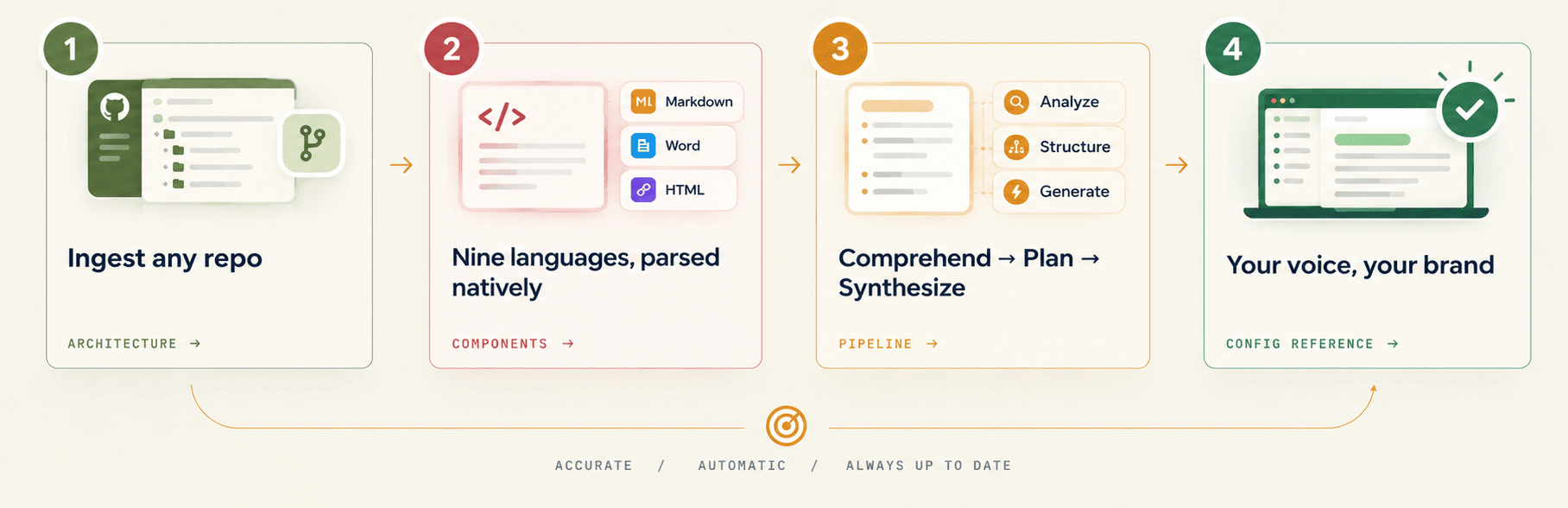
Four steps, left to right. 1, Ingest any repo: a repository connected from a git host, linking to Architecture. 2, Nine languages, parsed natively: source code output as Markdown, Word and HTML, linking to Components. 3, Comprehend, Plan, Synthesize: the pipeline analyzes, structures and generates, linking to Pipeline. 4, Your voice, your brand: a published, branded doc site marked complete, linking to Config reference. A loop returns from the end to the start, labelled accurate, automatic, always up to date.

Ingest any repo

Connect GitHub, GitLab, or Bitbucket through a git app. Parsing runs server-side against committed code — nothing runs on your laptop.

Comprehend → Plan → Synthesize

A three-stage pipeline, not a one-shot prompt. Git2Docs maps APIs, models, configs and business logic before it decides which pages should exist.

Nine languages, parsed natively

TypeScript, JavaScript, Python, Go, Rust, Java, C, C++ and Ruby — read as code, not guessed at from filenames.

Your voice, your brand

One consistent voice across every page, your typography and colors, and separate doc spaces for products that ship on their own schedules.

What you actually get

Generated from your code, then yours to shape

Real documentation with your brand on it — and a full editor behind every page, so nothing Git2Docs writes is beyond your reach.
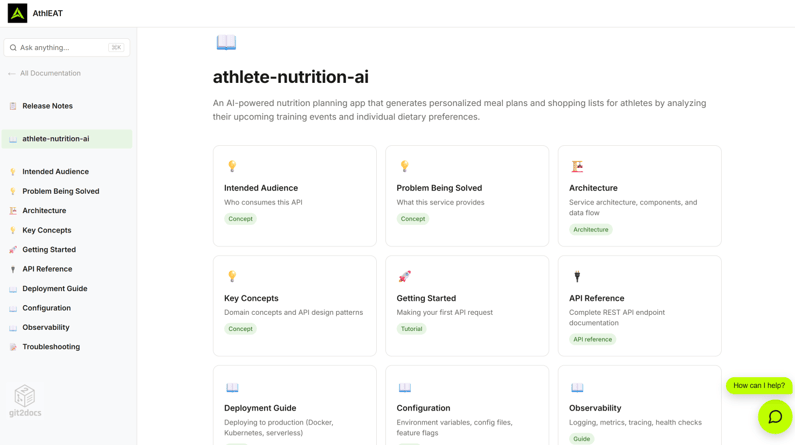
A Git2Docs documentation site for the athlete-nutrition-ai project. A sidebar lists Release Notes, Intended Audience, Problem Being Solved, Architecture, Key Concepts, Getting Started, API Reference, Deployment Guide, Configuration, Observability and Troubleshooting, above a search box. The main pane shows the project summary and a grid of page cards, each tagged Concept, Architecture, Tutorial, API reference or Guide. A How can I help? chat launcher sits in the corner.
Published output. A typed page index — concepts, tutorials, reference, guides — with sidebar navigation, search, and a support chat on every page that answers only from the published sections.
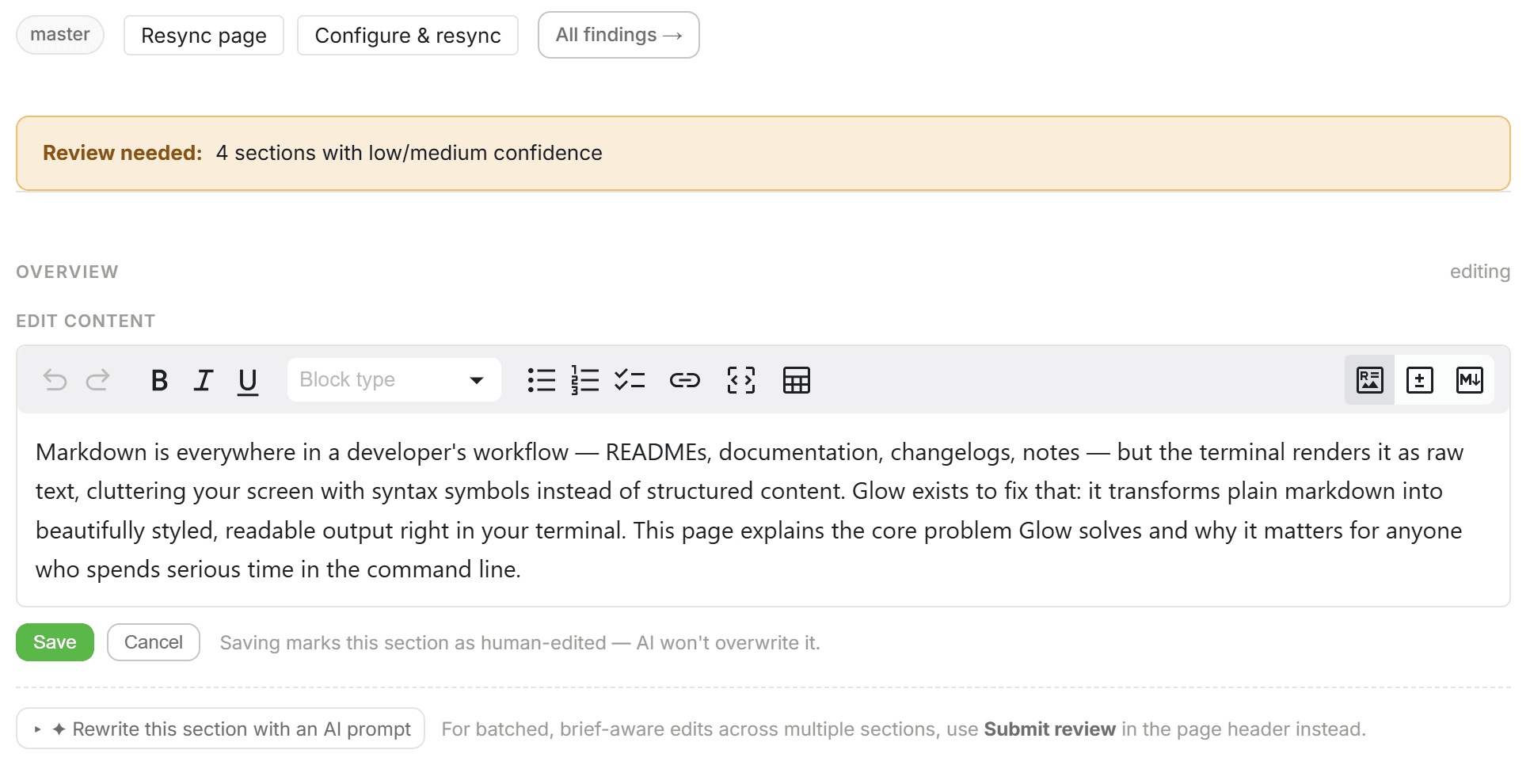
The Git2Docs section editor. A review banner reads four sections with low or medium confidence. A rich-text toolbar offers undo, bold, italic, underline, a block-type menu, bullet, numbered and task lists, links, code, tables, image, and markdown views above an editable paragraph. Below: Save and Cancel, a note that saving marks the section as human-edited so AI will not overwrite it, and an option to rewrite the section with an AI prompt.
Flexible Editing: Rich-text, Diff and Source Modes. Headings, lists, tables, links and code, edited in place — no markdown required. Saving marks the section as human-edited, so the next regeneration leaves your words alone.
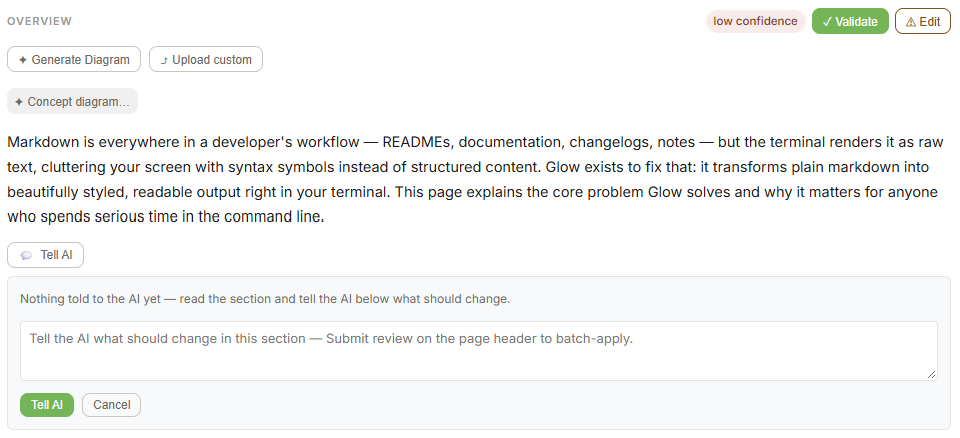
A documentation section titled Overview, flagged low confidence, with Validate and Edit buttons and options to generate a diagram or upload a custom one. Below the paragraph, a Tell AI panel reads: nothing told to the AI yet — read the section and tell the AI below what should change, above a text box prompting the writer to say what should change in this section, with Tell AI and Cancel buttons.
Tell AI. Point at a section, say what's wrong in plain English, get it rewritten in the doc's voice. No markdown archaeology.
02 / Measure

Two numbers, and neither of them is an opinion

“Looks good enough” is not a standard your agents can act on. Git2Docs replaces it with a count and a percentage, both of which move when your code does.

Findings → 0

A finding is one documented claim that doesn't match the code. Git2Docs names the page, the claim and the line it contradicts, then counts them. The target is zero and you can see how far away you are.

Artifacts →

Coverage → 100%

The share of your public surface that has documentation at all — measured against the symbols your code actually exports, not estimated from page count.

Artifacts →

Repo health

Docstring completeness, type coverage, example presence. The upstream signals that decide how good generated docs can be, scored before you publish anything.

Best practices →

Version-scoped workspace

Accuracy and coverage per release, not just for main. Know what shipped documented and what shipped bare.

Overview →

If you can't put a number on your documentation, you're asserting it's accurate. We'd rather show you.

03 / Converge

Measuring is step one. Closing the gap is the product.

A number you can't move is a scolding. Git2Docs runs a loop: validate, review the findings, regenerate, validate again — until the count stops falling because there's nothing left to find.

Runtime validation. Every documented CLI command and API call is executed against your live deployment. Not “does this look plausible” — does this actually work. Pipeline →
Validate with your coding agent. Paste the prompt URL into Claude Code, Codex or Antigravity. The agent fetches the manifest, exercises what's documented, and writes validation-findings.json. Upload it and Git2Docs fixes what it broke. Quick start →
Tell AI. Point at a section, say what's wrong in plain English, get it rewritten in the doc's voice. No markdown archaeology. Quick start →
Auto-sync on every push. Each push re-runs the pipeline and recalculates both metrics — whether or not anyone remembered to look. Pipeline →
Anchored facts

A claim that knows which line of code it came from

Most documentation states things. An anchored fact states something and records where in the repository it is true — versioned alongside the code, tied to the lines it describes. When that code is refactored the fact doesn't quietly go stale. It breaks, visibly.
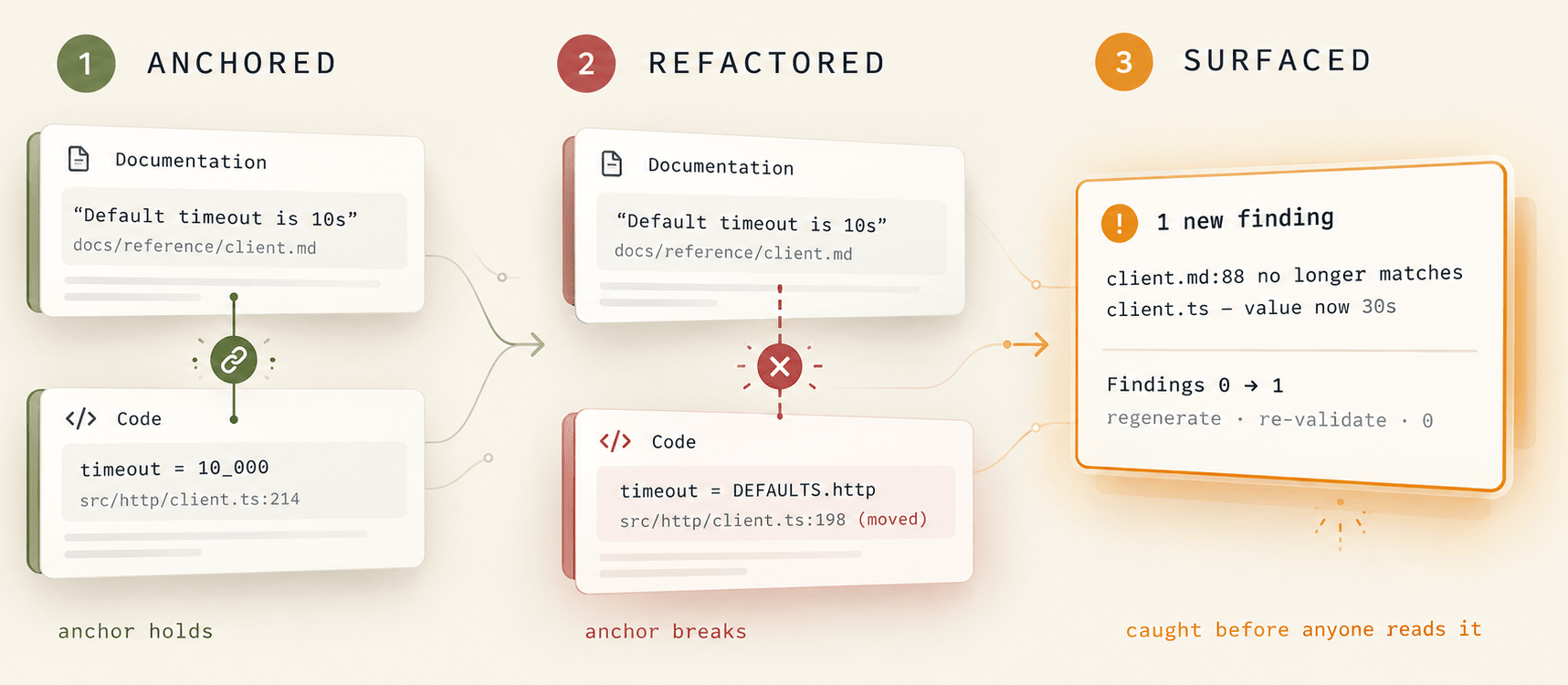
Three stages. 1, Anchored: a documentation claim, default timeout is 10s, linked to src/http/client.ts line 214 where timeout equals 10000 - the anchor holds. 2, Refactored: the code moves to line 198 and reads DEFAULTS.http, so the link breaks. 3, Surfaced: Git2Docs reports one new finding, client.md line 88 no longer matches client.ts, findings 0 to 1, caught before anyone reads it.

Authoring is a conversation: point Claude Code at your repo and the Git2Docs MCP server, and anchored facts get written and checked in the same pass.

04 / Serve

Docs that answer questions — to people and to agents

Measured documentation is only worth the measurement if something reads it. Git2Docs publishes to both audiences from one source.

MCP server — read and write

Your agents query your documentation instead of scraping a website. And because the server writes too, authoring runs through the same interface that validates — which is why the docs stay accurate instead of drifting between edits.

Components →

L1 support chatbot

Answers built only from your published doc sections, with citations. No training, no separate knowledge base, indexed automatically on publish.

Overview →

Published docs, branded

A fast documentation site with your brand on it, search, and multiple spaces. The part every vendor has — ours just happens to be measured.

Gallery →
FAQ

Questions people ask before they trust a number

How does Git2Docs verify that documentation is accurate?
Git2Docs checks each documented claim against the source code it describes and executes every documented CLI command and API call against your live deployment. Mismatches are reported as findings, each naming the page, the claim, and the code it contradicts. The count of findings is the accuracy metric; the target is zero. A second metric, coverage, reports what percentage of your public surface is documented at all. For more information please read this post.
What is the difference between Git2Docs and Mintlify?
Mintlify is a documentation platform: it hosts and styles documentation that you or an AI write. Git2Docs generates documentation from your repository and then measures it against the code, reporting accuracy as a count of findings and coverage as a percentage of your public surface. The difference is verification: Git2Docs tells you, with a number, how much of your documentation currently contradicts your code, and runs a validation loop to drive that number to zero. For more details please read this detailed comparison page.
Does Git2Docs work with coding agents?
Yes, in both directions. Git2Docs runs an MCP server that agents query for documentation instead of scraping a website, and the server supports writes, so agents author and correct docs through the same interface. For validation, you copy a prompt URL into Claude Code, Codex, or Antigravity; the agent exercises what the docs claim against your deployment, writes a validation-findings.json file, and Git2Docs applies the corrections.
What are anchored facts?
An anchored fact is a documented claim that is versioned in your repository and linked to the specific source lines it describes. When that code is refactored, the fact fails its check and surfaces as a finding instead of silently going stale.
Which languages does Git2Docs support?
TypeScript, JavaScript, Python, Go, Rust, Java, C, C++, and Ruby, parsed natively from committed source in GitHub, GitLab, or Bitbucket repositories.
Does documentation update automatically when code changes?
Yes. Git2Docs re-runs its pipeline on every push, regenerating affected pages and recalculating accuracy and coverage, so the metrics reflect the current state of the repository without anyone triggering a rebuild.

Find out how wrong your docs are

Connect a repository and get your first findings count in under five minutes. Free for 30 days, no card.